
6.2 KiB
💿 Discarr
Scan disc rips. Map titles. Queue HEVC encodes. Notify Sonarr and Radarr when done.



Discarr is a Node.js web UI (no npm packages) that bridges your disc ripping workflow with Sonarr and Radarr. Point it at a VIDEO_TS or BDMV directory, map the title to the right episode or movie in your library, and let it handle the HEVC encode and import.
No npm packages. No Python. No config files to edit by hand — just a browser, your API keys, and the system tools you probably already have (ffmpeg, HandBrake).
Screenshots
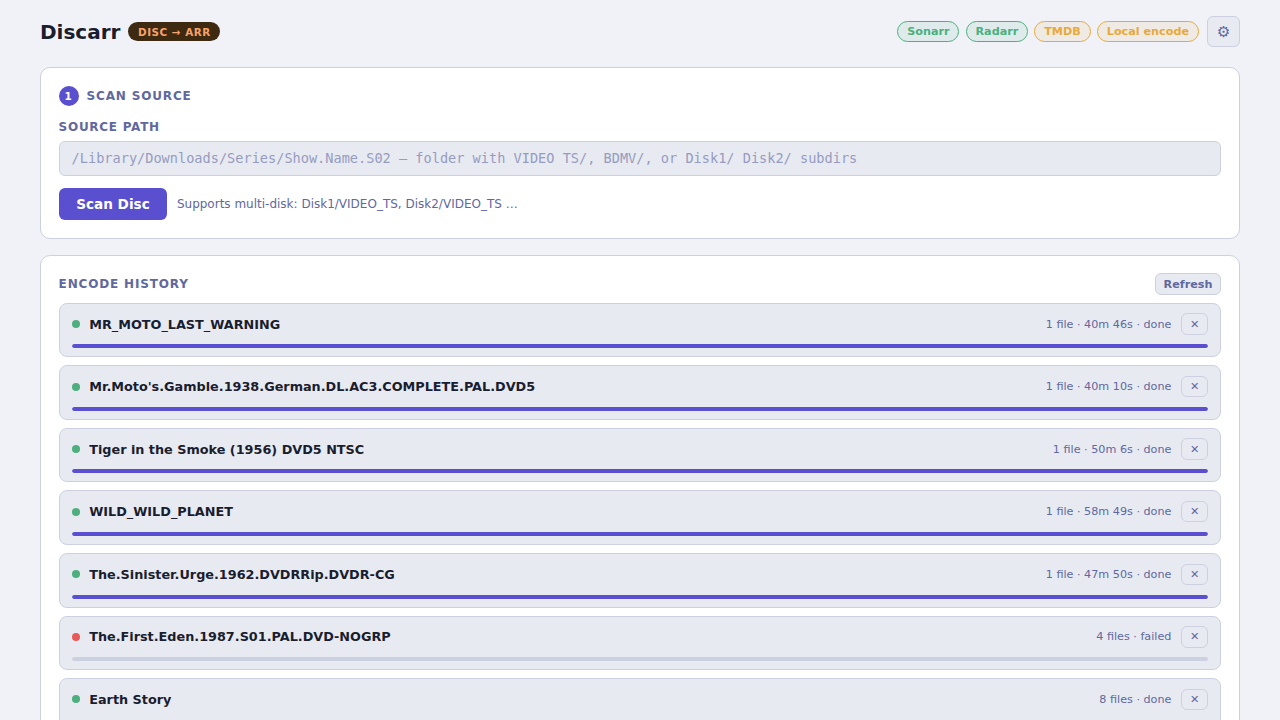
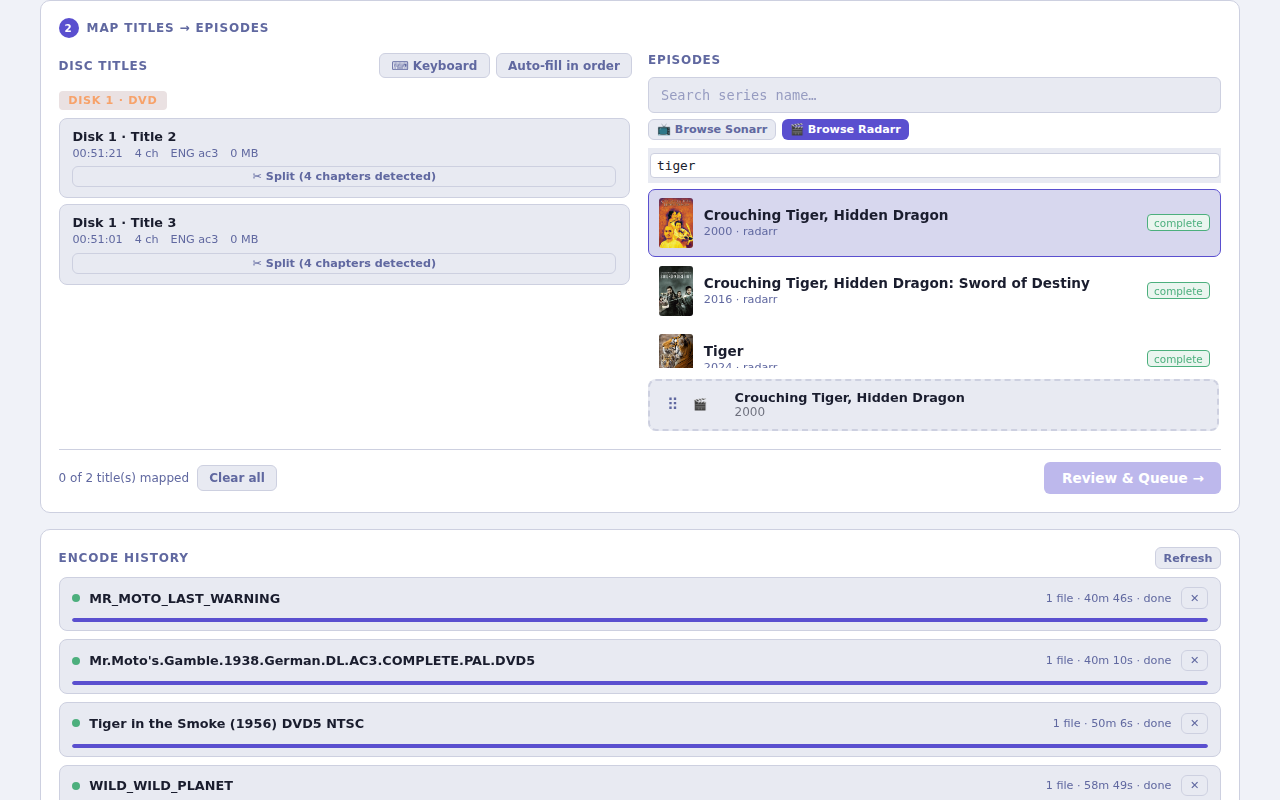
Features
- Disc scanning — detects
VIDEO_TS,BDMV, multi-disc, and ISO structures automatically - Episode/movie mapping — web UI maps disc titles to Sonarr episodes or Radarr movies
- HEVC encode queue — dispatches ffmpeg or HandBrake jobs locally or over SSH to a remote host
- IFO chapter extraction — reads DVD structure to split multi-episode discs correctly
- Sonarr/Radarr notification — custom script hooks notify on import, file delete, or completion
- qBittorrent integration — optional hook triggers a scan automatically on torrent completion
- Tdarr notification — optional ping to Tdarr after encode completes
- Persistent job queue — survive restarts; jobs resume automatically
- No npm deps — pure Node.js built-ins only
Quick start
git clone https://git.opensourcesolarpunk.com/Circuit-Forge/discarr
cd discarr

# Set up your API keys
mkdir -p ~/.config/media-postprocessor
cp api-keys.conf.example ~/.config/media-postprocessor/api-keys.conf
$EDITOR ~/.config/media-postprocessor/api-keys.conf

# Run
node server.js
Open http://localhost:8603 — paste a disc path and click Scan.
Install
Native installer (recommended)
Handles Node.js, ffmpeg, HandBrake CLI, and DVD libraries automatically. Supports Ubuntu/Debian, Fedora/RHEL, Arch, and macOS.
git clone https://git.opensourcesolarpunk.com/Circuit-Forge/discarr
cd discarr
sudo bash install.sh
The installer will ask if you want to register a systemd service. Override defaults with env vars:
sudo DISCARR_INSTALL_DIR=/opt/discarr DISCARR_PORT=8603 REGISTER_SERVICE=yes bash install.sh
System dependencies installed
| Dependency | Required | Purpose |
|---|---|---|
| Node.js 18+ | Yes | Runtime |
| ffmpeg + ffprobe | Yes | Disc metadata scanning, encode dispatch |
| HandBrake CLI | Recommended | HEVC encoding (falls back to ffmpeg if absent) |
| libdvdcss | Recommended | CSS-encrypted DVD decryption |
| libdvdread + libdvdnav | Yes (DVD) | DVD structure and navigation reading |
Note on libdvdcss: Legal in most jurisdictions for personal use. Ubuntu users:
libdvd-pkgbuilds it from source. Fedora users: requires RPM Fusion. The installer handles both.
Docker
Two pre-built variants are available:
| Tag | Includes | Use when |
|---|---|---|
latest / 0.1.2 |
ffmpeg, openssh-client | Default — ffmpeg handles all encoding |
handbrake |
+ HandBrake | You need HandBrake presets or forced-subtitle burn-in |
# Default (recommended)
docker run -d \
  -p 8603:8603 \
  -v ~/.config/media-postprocessor:/root/.config/media-postprocessor:ro \
  -v ~/.local/share/discarr:/root/.local/share/discarr \
  -v /path/to/media:/media \
  pyr0ball/discarr:latest

# HandBrake variant
docker run -d \
  -p 8603:8603 \
  -v ~/.config/media-postprocessor:/root/.config/media-postprocessor:ro \
  -v ~/.local/share/discarr:/root/.local/share/discarr \
  -v /path/to/media:/media \
  pyr0ball/discarr:handbrake
Or build from source:
docker build -t discarr .                                    # default
docker build -f Dockerfile.handbrake -t discarr:handbrake . # HandBrake variant
docker run -d \
  -p 8603:8603 \
  -v ~/.config/media-postprocessor:/root/.config/media-postprocessor:ro \
  -v ~/.local/share/discarr:/root/.local/share/discarr \
  -v /path/to/media:/media \
  discarr
Manual (from source)
git clone https://git.opensourcesolarpunk.com/Circuit-Forge/discarr
cd discarr
# Install deps manually (see table above), then:
node server.js
Config
All config lives in ~/.config/media-postprocessor/api-keys.conf (see api-keys.conf.example). Every key can also be set as an environment variable — env vars override the config file.
# Minimum required config
SONARR_URL=http://your-sonarr-host:8989/sonarr
SONARR_API_KEY=your-sonarr-api-key

RADARR_URL=http://your-radarr-host:7878/radarr
RADARR_API_KEY=your-radarr-api-key
Environment variables
| Variable | Default | Description |
|---|---|---|
PORT |
8603 |
Web UI port |
DISCARR_CONFIG |
~/.config/media-postprocessor/api-keys.conf |
Config file path |
DISCARR_LOG |
~/.local/share/discarr/jobs.log |
Job log path |
DISCARR_QUEUE |
~/.local/share/discarr/pending-queue.json |
Pending queue path |
Notification hooks
Drop the scripts from scripts/ as custom hooks in your arr apps and qBittorrent:
| Script | Where to set it |
|---|---|
scripts/sonarr-notify.sh |
Sonarr: Settings → Connect → Custom Script → On Import, On Episode File Delete |
scripts/radarr-notify.sh |
Radarr: Settings → Connect → Custom Script → On Import, On Movie File Delete |
scripts/qbittorrent-notify.sh |
qBittorrent: Options → Downloads → Run external program on torrent completion |
All scripts respect the DISCARR_URL environment variable (default: http://127.0.0.1:8603).
Related
- Recovarr — re-trigger Sonarr/Radarr imports for corrupted or missing media files
Contributing
Issues and PRs welcome. Please open an issue before starting a large change.
License
GPL-3.0 — see LICENSE.