 pyr0ball
01aae2eec8
pyr0ball
01aae2eec8
Recipe corpus (#108):
- Add _MAIN_INGREDIENT_SIGNALS to tag_inferrer.py (Chicken/Beef/Pork/Fish/Pasta/
  Vegetables/Eggs/Legumes/Grains/Cheese) — infers main:* tags from ingredient names
- Update browser_domains.py main_ingredient categories to use main:* tag queries
  instead of raw food terms; recipe_browser_fts now has full 3.19M row coverage
  (was ~1.2K before backfill)

Bug fixes:
- Fix community posts response shape (#96): add total/page/page_size fields
- Fix export endpoint arg types (#92)
- Fix household invite store leak (#93)
- Fix receipts endpoint issues
- Fix saved_recipes endpoint
- Add session endpoint (app/api/endpoints/session.py)

Shopping list:
- Add migration 033_shopping_list.sql
- Add shopping schemas (app/models/schemas/shopping.py)
- Add ShoppingView.vue, ShoppingItemRow.vue, shopping.ts store

Frontend:
- InventoryList, RecipesView, RecipeDetailPanel polish
- App.vue routing updates for shopping view

Docs:
- Add user-facing docs under docs/ (getting-started, user-guide, reference)
- Add screenshots
1.9 KiB
1.9 KiB
Kiwi — Pantry Tracker
Stop throwing food away. Cook what you already have.
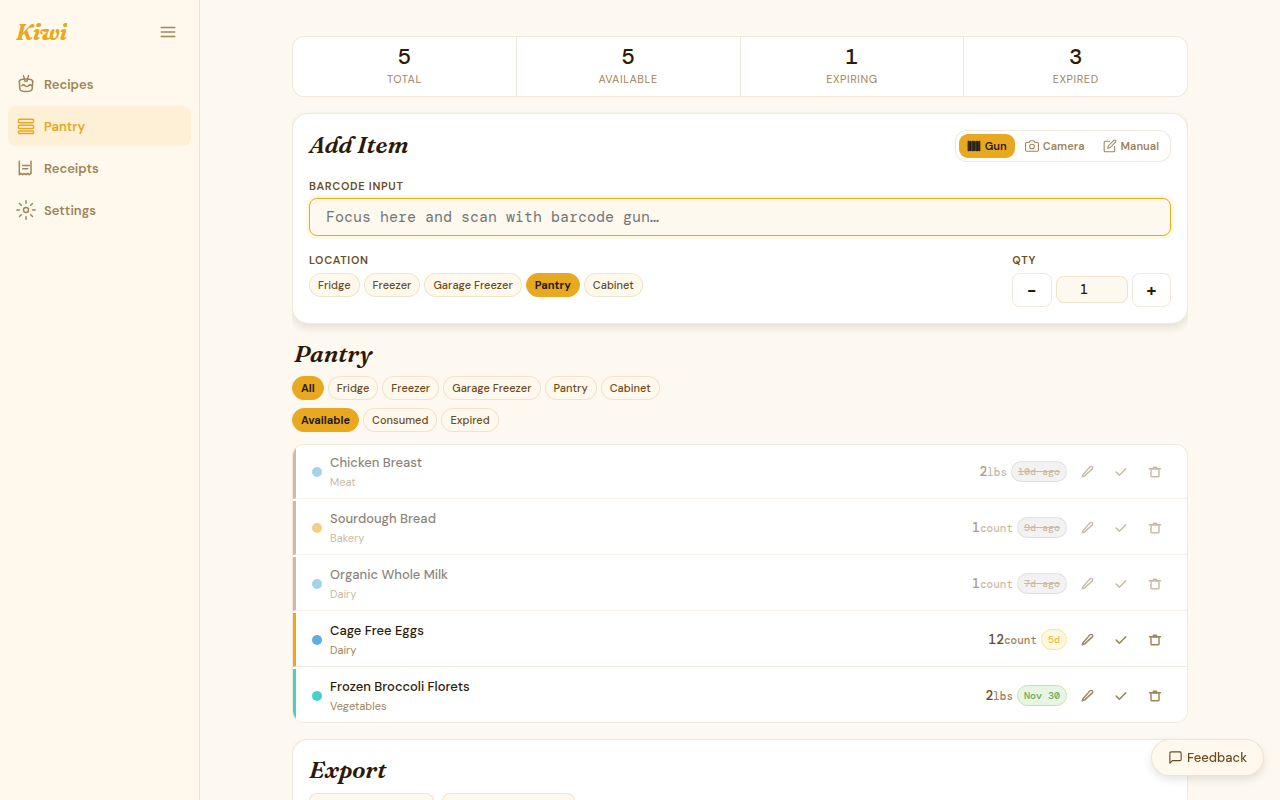
Kiwi tracks your pantry, watches for expiry dates, and suggests recipes based on what's about to go bad. Scan barcodes, photograph receipts, and let Kiwi tell you what to make for dinner — without needing an AI backend to do it.
What Kiwi does
- Inventory tracking — add items by barcode scan, receipt photo, or manual entry
- Expiry alerts — know what's about to go bad before it does
- Recipe browser — browse by cuisine, meal type, dietary preference, or main ingredient; see pantry match percentage inline
- Leftover mode — prioritize nearly-expired items when getting recipe suggestions
- Receipt OCR — extract line items from receipt photos automatically (Paid / BYOK)
- Recipe suggestions — four levels from pantry-match corpus to full LLM generation (Paid / BYOK)
- Saved recipes — bookmark any recipe with notes, 0–5 star rating, and style tags
- CSV export — export your full pantry inventory anytime
Quick links
- Installation — local self-hosted setup
- Quick Start — add your first item and get a recipe
- LLM Setup — unlock AI features with your own backend
- Tier System — what's free vs. paid
No AI required
Inventory tracking, barcode scanning, expiry alerts, the recipe browser, saved recipes, and CSV export all work without any LLM configured. AI features (receipt OCR, recipe suggestions, style auto-classification) are optional and BYOK-unlockable at any tier.
Free and open core
Discovery and pipeline code is MIT-licensed. AI features are BSL 1.1 — free for personal non-commercial self-hosting, commercial SaaS requires a license. See the tier table for the full breakdown.